發表文章

目前顯示的是有「effect」標籤的文章

Substance Designer對於特效美術的應用
圖片
🔔關於Substance Desiner 在特效製作上的應用 由於很多朋友對於Substance Designer (簡:SD) 感到好奇,所以我錄製了三段影片來跟大家分享,如何運用SD來幫助特效工作效率與成果更加提升。 📌RzFX Substance Designer for VFX texture | Designer與特效貼圖製作常用節點 https://youtu.be/c21kwutgSKw 在這段影片中簡單介紹什麼是SD,介面的簡單認識以及在特效貼圖製作上常用的節點介紹。 📌 RzFX Substance Designer for VFX material workflow | Designer 與UE4 Material 編輯流程 https://youtu.be/sEfM-3KfGtE 這段影片主要分享我平時利用SD與Unreal Engine,當然也可以Unity無關乎引擎,在製作Material/shader的工作流程,也分享幾個簡單的貼圖案例。 📌 RzFX Substance Designer for Texture Asset | 製作貼圖資料庫 https://youtu.be/KcOfXZ51nSk 主要是介紹如何使用SD裡的Function來製作各種效果參數的變化,以及Substance Player的基本操作,透過這些變化可以讓貼圖的結果更加有彈性與變化性,並藉此建立個人甚至是公司團隊的貼圖資料庫。 利用這樣的製程還可以搭配SHADER製作來與團隊分享,縱使團隊成員不是每個人都具備SD或者編輯SHADER的能力,都可以透過這樣的製程來快速產出效果的變化,對於大團隊的特效貼圖資源控管可以起到很好的作用。 而且隨著時間或專案的變化,也可以不定期地回頭優化節點效果,幫助資料庫的效果更加豐富以及品質提升,我認為對於個人與團隊來說都是相當不錯的解決方案。 其實使用下來你會發現很多觀念都跟Shader可視化編輯器是一模一樣的概念喔! 總結一下我推薦的幾項重點: 1.程序式無縫紋理,省去傳統做法需額外處理無縫效果,更專注效果製作。 2.隨意更改貼圖尺寸不影響解析度。 3.快速調整亂數採樣或微調各項參數,即可快速得到新的效果,提升迭代效率。 4.提供豐富的參數與節點,高彈性的創作可能。 5.精準的紋理數值,非常適合製作Shader編輯時所需...

Shader Math (04) Basic Shader Mask

圖片
Shader Math (04) / Basic Shader Mask   一些基礎常見的Shader 遮罩 01  02 03   04  05 06 07 08 09 10

Shader Math (03) Radar World Grid 雷達掃描

圖片
雷達掃描 Radar World Grid DEMO VIDEO https://youtu.be/IPES56mTrUM   Shader by Amplify shader editor Full Size

Zelda Stylize Camp Fire 薩爾達風格營火特效

圖片
Youtube影片連結 主要由三組元件構成,依序是火星、營火本體、煙霧。 Here is three elemnts : Fire embers、Camp fire、Smoke。 環境Unity 2018.2.4 及使用 PostProcessing的Bloom。 Amplify shader editor 1.6.7製作Shader。 Substance designer 2018 製作貼圖。 Build in Unity 2018.2.4 with PostProcessing for bloom. Amplify shader editor 1.6.7 for shader. Substance designer 2018 for texture. 營火 Camp Fire 首先說明營火的製作方式,製作一張RGBA通道的貼圖,分別為 R=營火中心、G=營火外圍、BA=營火擾動的雜訊。 In the beginning, we need a texture for shader of camp fire. Included RGBA: R for the center of camp fir、G for the outside of fire、B and A for the distortion.   貼圖導入Unity中須設定成Clamp The texture setting has to be clamp warp mode. 接著開始進行製作營火的Shader, 下面這張圖是此Shader的全貌,基本上只做一件事情就是透過流動貼圖(Flow Map)的概念來實現營火擾動的效果,分為核心營火(R通道)擾動較小及外圍營火(G通道)擾動較大兩組,再將兩者相加來實現火焰的豐富性,最後就是基礎的顏色添加。 Here is the full graph of camp fire shader. The main point is to create the UV distortion within the flow map. I make it to be two value, one is the low distortion work for the center fire (R ch...

RzFX Hologram Effect 科幻風投影物件

圖片
Demo Video 此檔案可以透過Buy me a coffee 取得,內容包含SHADER完整的編輯檔可透過Amplify shader editor 1.5.8開啟編輯,也包含完整個SHADER截圖方便觀看,建議使用Unity 2018.2.4以上開啟。 Here is the full package that included a prefab and shader and shader snapshot, shader could be edited at Amplify shader editor 1.5.8. Build in Unity 2018.2.4 or higher. Download Link https://bmc.xyz/l/hgRzOBNli 感謝支持囉!  Thank you! Enjoy it :)

Shader Math (01)

圖片
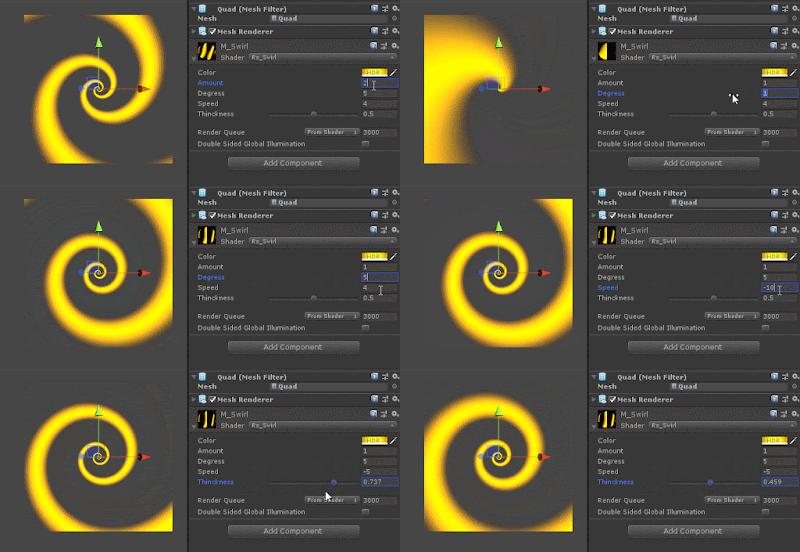
螺旋圖形 Swirl Shader Unity 2018.2.4 + shader Graph FullSize

Shader: Sin wave trail 波形擺動拖尾效果

圖片
大家好! 今天跟大家分享先前製作的效果Ghost Trail 波形擺動拖尾效果。 Hi, everyone. I`m glad to share the breakdown of the Ghost Trail Effect. 在這此效果中僅使用了一組粒子系統搭配其中的Trail組件及模型粒子來實現,而如何透過一組Trail面板來實現看似三條拖尾的擺動效果,正是此Shader表現的重點。 It was done with just a particle system, and it is particle mesh render within trail component. The issue of the effect is how to create three different swing trail on a single plane. Shader是使用Amplify Shader Editor1.5.8 製作亦可使用內建Shader graph實現,先看一下整個Shader樹狀圖。 The shader is made by Amplify shader editor 1.5.8. It also could do it with shader graph in Unity. 大圖Full Size 貼圖使用Substance Designer 2018  Texture made by Substance designer 2018 R: 拖尾紋理1 / for trail 1. G: 拖尾紋理2 / for trail 2. B: 拖尾擾動 / the noise of distortion. A: 消散雜訊紋理 / the noise for dissolve. 大圖Full Size Shader的製作 Breakdown of shader 1.基礎Shader屬性設定 Setting property  2.Shader大圖中Sin01的區塊為擺動UV的產生,Sin02及03僅是重複01計算後,改變其波長頻率時間等來製作三種不同擺幅 。 The Sin01 block is working for the motion of V coo...